Web Development
A No-Signup Invoice Generator: PDFs in the Browser With Svelte 5
 Adam Speer
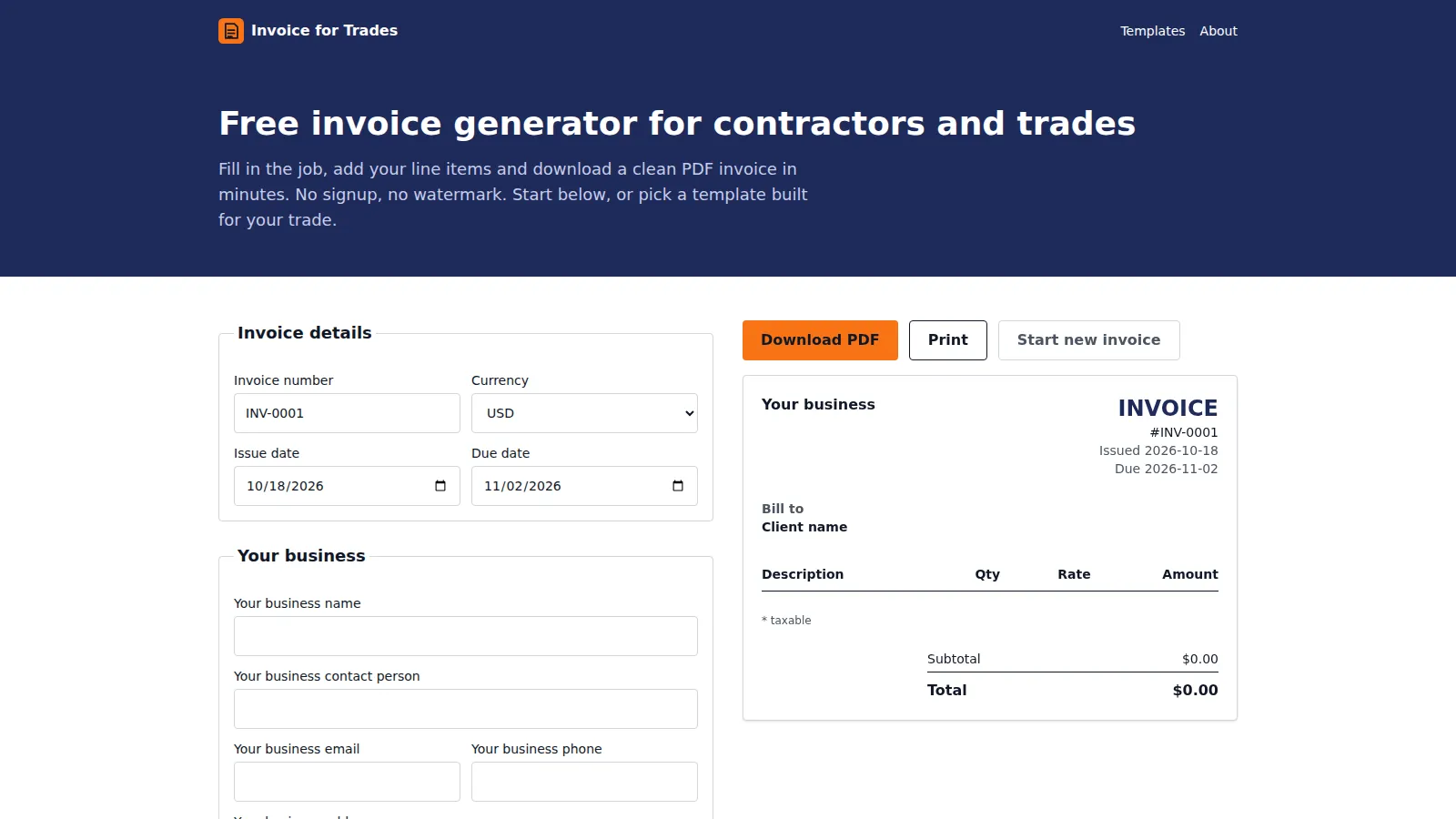
Every tradesperson I know has the same invoicing story. They need to send one invoice, they search for a template, and every result wants them to make an account, start a free trial, or accept a big watermark on the PDF. For one invoice.
So we built Invoice for Trades. You fill in the form, you download a clean PDF. No signup, no watermark, and your invoice never touches our server. Here’s how it works and a few things I learned along the way.
The stack
- Astro 7 for the site, fully static.
- Svelte 5 for the invoice editor, the only interactive part of the page.
- pdfmake to generate the PDF in the browser.
- Tailwind 4 for styling, deployed on Vercel.
The site is about 95% content and one widget, so it didn’t make sense to ship a whole app framework for it. Astro renders everything as plain HTML, and the editor mounts as a single Svelte island. No React anywhere.
Svelte 5 runes made the editor easy
The whole invoice is one reactive object, and totals are derived from it:
invoice = $state<Invoice>(createInvoice());
totals = $derived(calcTotals(this.invoice));
Change a quantity and the subtotal, tax, discount and total all update. No stores to wire up, no manual subscriptions. Money is kept in integer cents the whole way through so you never get a total that’s off by a penny from floating point math.
No accounts means localStorage
If there’s no signup, where does your draft go? Your browser. The editor autosaves to localStorage about 300ms after you stop typing. Two things get saved:
- The invoice draft, one per trade page, so your plumbing invoice and your landscaping invoice don’t overwrite each other.
- Your business details, shared across every page. You type your name, address and logo once, and they’re there next time.
Every read and write is wrapped in a try/catch. Safari’s private mode will throw on localStorage access, and a broken save shouldn’t take down the whole editor.
PDFs without a server
This was the part I expected to be painful, and it mostly wasn’t. pdfmake takes a JSON description of the document (tables, columns, text styles) and draws real vector text, so the PDF looks sharp and the text is selectable.
The catch is that pdfmake and its fonts are heavy. So we don’t load them until you click download:
const [core, fonts] = await Promise.all([
  import("pdfmake/build/pdfmake"),
  import("pdfmake/build/vfs_fonts"),
]);
The page loads fast, and the cost only shows up for people who actually want a PDF, at the moment they want it.
The layout itself is a pure function that takes an invoice and returns a document definition. No DOM, no browser APIs. That means we can unit test the PDF layout in Node without ever opening a browser.
Safari, of course
Two things bit us, both on Safari:
- Print popups get blocked if you open the window after an
await. Safari only lets you open a new window during the original click. So we open the blank window first, then generate the PDF, then point the window at it. If the popup still gets blocked, we fall back to opening the PDF in the current tab. Your draft survives because it’s in localStorage. - iOS doesn’t always respect the download attribute. We check for support and open the PDF in a new tab when it’s missing, so the user can save or share it from there.
27 trade pages without thin content
The SEO side of this is 27 landing pages, one per trade: plumbers, electricians, mechanics, landscapers and so on. Each one loads the same editor with trade-specific line items already filled in.
The risk with pages like this is that they turn into the same page with a different title, and search engines are good at spotting that. So every trade is a structured content file with rules enforced at build time:
- 5 to 10 preset line items specific to the trade
- 3 to 4 written sections of 80 to 200 words each
- 4 to 6 FAQs, plus trade-specific tax notes
- a meta description between 120 and 160 characters
If a page doesn’t meet the rules, the build fails. There’s also a test that checks no two trades share a section heading or FAQ question.
One small fix that made a big difference
Because the editor is client-only, the page used to render with a gap where the editor would go, then jump when it loaded. Our Cumulative Layout Shift score was 0.567 on the homepage, which is bad. The fix was one line: give the editor’s wrapper a minimum height so the browser reserves the space up front. CLS dropped to 0.
What I’d tell someone building something similar
Keep the interactive part as small as you can. Most “apps” like this are really content sites with one tool in them, and treating them that way makes everything faster, cheaper to host, and easier to rank.
You can read the full Invoice for Trades case study, or try the generator yourself. It’s free.